Ninja Auto-iQ programs run a preset mix of pulsing, blending, and pauses, so you load the vessel, lock it, and press one button. Fit the right blade, vessel, and lid onto the motor base, pick the program that matches your recipe, and let it run. Press the same program again to pause, and use Stop or wait for the timer to reach zero before you remove anything.
Quick answer
Set the base on a flat counter, install the blade, add liquid first, lock the lid and vessel until they click, then press the matching Auto-iQ program. Wait for the blade to stop before unlocking.
- Best for smoothies: Smoothie or Extract program
- Best for chopping: short manual Pulse bursts
- Best for bowls and sauces: processor bowl programs
- Auto-iQ automates pulsing, blending, and pausing. You do not need to watch it.
- Program names, vessels, and cycle times differ by model. Check your own manual.
- Pause means pressing the active program again. Stop ends the cycle fully.
- If the unit will not start, the cause is usually a vessel or lid that is not locked.
- Follow the MAX LIQUID and MAX FILL lines on your own vessel.
- What does Auto-iQ do on a Ninja blender?
- How do you assemble a Ninja Auto-iQ blender before blending?
- Worked smoothie example
- How do you use Auto-iQ on a Ninja Kitchen System?
- How do you use Auto-iQ with the Professional Processor bowl?
- Which Auto-iQ program should you use?
- Can you use Low, High, and Pulse instead of Auto-iQ?
- How do you pause or stop an Auto-iQ program?
- How much can you put in the vessel?
- Why will a Ninja Auto-iQ blender not start?
- How do you safely remove the blade and clean the blender?
- What do owners say?
- Frequently Asked Questions
What does Auto-iQ do on a Ninja blender?
Auto-iQ uses preset pulsing and pausing patterns to automate blending. Instead of holding a button or timing a run yourself, you press one program and the motor does the work.
The pauses matter. They let ingredients fall back toward the blade between bursts. That is why a preset cycle often handles frozen fruit and ice better than a plain steady run.
Not every Ninja has the same programs. Some models are built around a pitcher. Others use single-serve cups or a processor bowl. The program labels follow the vessel, so read the buttons on your own base.
How do you assemble a Ninja Auto-iQ blender before blending?
Place the base on a flat, dry counter, install the blade in the vessel, add food, and lock the vessel and lid. Ninja pitcher assembly commonly means setting the pitcher in the diamond position, turning it clockwise to lock, and pressing the lid on until it clicks.
Setup checklist
- Base placement: Put the motor base on a flat surface near an outlet.
- Blade installation: Fit the correct blade for the vessel. Pitchers, cups, and processor bowls use different blades.
- Ingredient order: Add liquid first, then soft items, then frozen items and ice on top.
- Lid locking: Press the lid on until it clicks.
- Vessel alignment: Line the vessel up with the base and turn it clockwise until it locks.
- Program selection: Plug in, then press the program that matches your recipe.
Single-serve cup setup
Cups work upside down. On a supported BN400 model, you invert the cup with the blade assembly on, line it up with the slots on the base, and turn it clockwise until it clicks. Then you press the program button, according to the BN400 Series FAQs from Ninja.

Worked smoothie example
Here is a simple smoothie from start to finish. Amounts are examples only. Stay under the MAX LIQUID and MAX FILL lines on your own vessel.
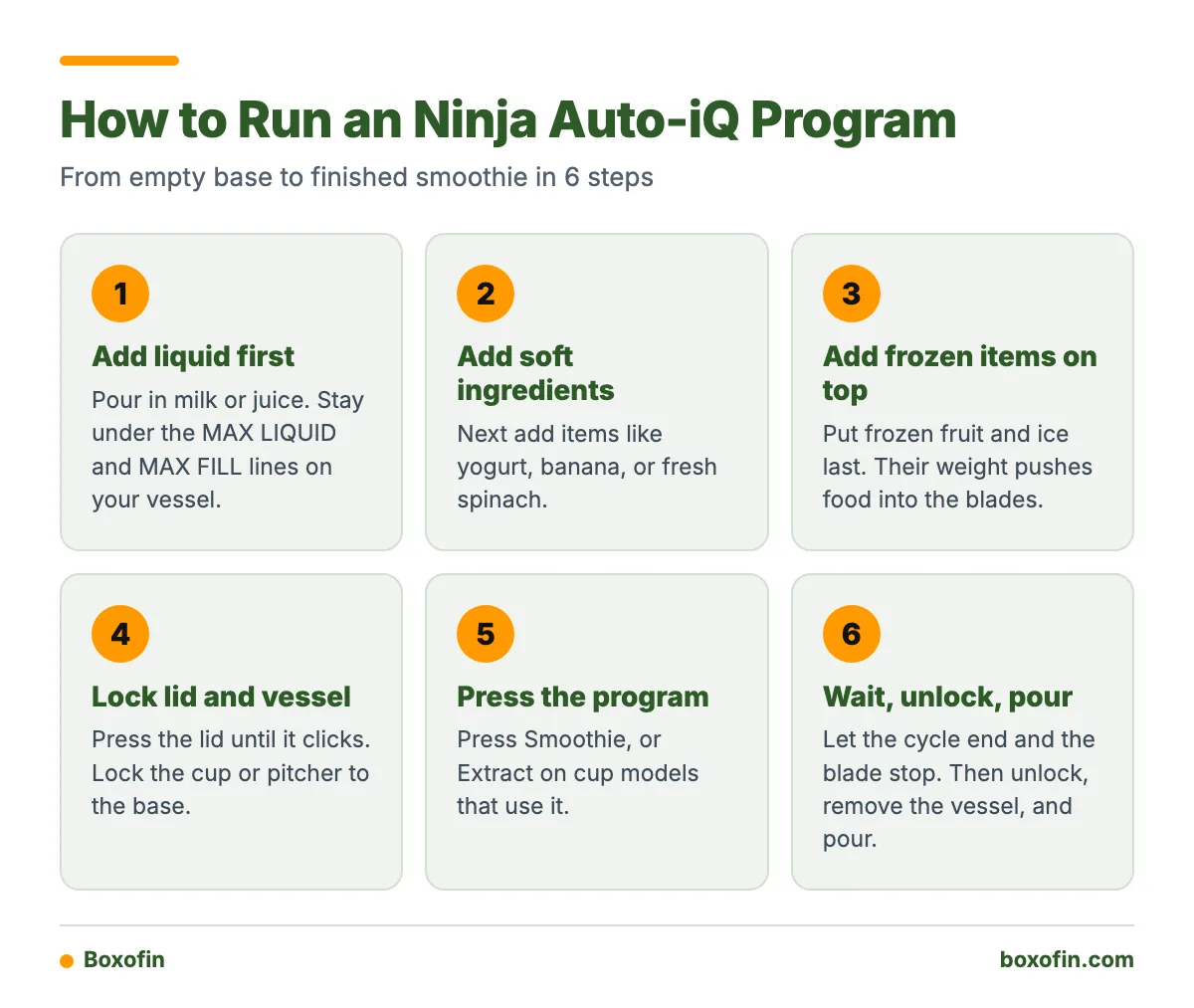
- Pour in your liquid, such as milk or juice.
- Add soft ingredients next: yogurt, banana, or fresh spinach.
- Add frozen fruit and ice last, on top.
- Lock the lid. Lock the cup or pitcher to the base.
- Press Smoothie (or Extract on cup models that use it).
- Wait for the cycle to end and the blade to stop.
- Unlock, remove the vessel, and pour.
Liquid goes first because it sits near the blade and helps pull the solid pieces down. Frozen items on top add weight that pushes food into the blades.
How do you use Auto-iQ on a Ninja Kitchen System?
A Kitchen System gives you a pitcher, cups, and a processor bowl on one base. Choose the vessel for the job, fit its own blade, lock it on, and pick a program built for that vessel.
Ninja’s SS300/SS350 FAQ recommends Extract or Smoothie for the Power Nutri Cup. For the Power Nutri Bowl, it points to BOWL or SPREAD/BOWL or SAUCE, depending on the model. Some of these systems also offer manual speeds from 1 through 10, with a continuous run time of 60 seconds.
The processor bowl has its own separate blade attachment. Do not put a pitcher blade in the bowl. Mixing up blades is a common first-week mistake, because the parts look alike and stack differently.
How do you use Auto-iQ with the Professional Processor bowl?
Fit the bowl on the base, install the processor blade or dough blade that suits your task, add food, lock the lid, and select the chopping, mixing, or dough program your model offers.
- Seat the bowl on the base and turn it until it locks.
- Slide the blade onto the center post. Hold the blade by the hub, not the edges.
- Add food in even pieces. Cut large items down first.
- Lock the lid so it clicks into place.
- Pick a program or short Pulse bursts, depending on texture.
From the Shop
A pattern shows up often in owner feedback: people grab the pitcher blade for a bowl job because it was already on the counter. The lid then locks badly, or the result is uneven. Keep each blade next to its own vessel and the problem goes away.
Which Auto-iQ program should you use for smoothies, frozen drinks, puree, sauces, or dough?
Match the program to the food and the vessel. This table shows common pairings. Names differ by model, so use it as a guide and confirm against your own buttons.
| Task | Program to look for | Vessel | Type of cycle |
|---|---|---|---|
| Smoothie | Smoothie | Pitcher or cup | Blending |
| Nutrient extraction | Extract | Nutri cup | Blending |
| Frozen drink | Frozen drink or ice crush, if your model has it | Pitcher | Blending |
| Puree or soup base | Puree-type program or High | Pitcher | Blending |
| Sauce or spread | BOWL, SPREAD/BOWL, or SAUCE | Processor bowl | Food processing |
| Dough | Dough program, if available | Processor bowl, dough blade | Food processing |
| Chunky chop | Pulse (manual) | Processor bowl | Food processing |

Can you use Low, High, and Pulse instead of Auto-iQ?
Yes, on models that have those buttons. Low and High run continuously until stopped, and Pulse runs only while the button is pressed. Auto-iQ is hands-off. Manual controls give you more say over texture.
Which control should you pick?
- If the recipe is a standard smoothie or frozen drink, use Auto-iQ.
- If you are making a thin liquid like a soup base and want to watch texture, use continuous Low or High, and stop it yourself.
- If you are chopping vegetables, nuts, or herbs, use short Pulse bursts and check often.
How do you pause or stop an Auto-iQ program?
On supported models, press the same active Auto-iQ button to pause the cycle. Press Stop to end the program. These are different actions. Pausing holds your place, and Stop clears it.
Pulse is a third thing. It only runs while you hold the button, so releasing it stops the motor. It is not a pause.
When the program ends or you stop it, switch the appliance off and wait for the blade to stop before removing the vessel. Never reach in or lift the lid while the blade is still spinning.
How much liquid and food can you put in the pitcher, cup, or processor bowl?
Use the markings printed on your own vessel. Capacity is not the same across models, so no single number fits every Ninja. Look for MAX LIQUID and MAX FILL.
- MAX LIQUID: do not pour liquid above this line.
- MAX FILL: do not stack solid food above this line.
- Hot liquids need extra care. Follow the instructions in your manual for hot blending, since pressure can build in a closed vessel.
Overfilling causes weak blending, leaks from the lid, and strain on the motor. If a recipe is too big, split it into two batches.
Why will a Ninja Auto-iQ blender not start?
The most common cause is that the vessel or lid is not fully locked. The safety interlock keeps the motor off until everything sits in place.
- Check vessel alignment. Pitchers need to sit in the diamond position and turn clockwise. Cups must line up with the base slots and turn until they click.
- Check the lid. Press it down until it clicks. A lid that sits high will not trigger the lock.
- Check the blade. A blade that is not seated can stop the vessel from locking.
- Check the power. Make sure the cord is firmly plugged into a working outlet.
- Check for a finished cycle. Some units need Stop pressed, or the power button toggled, before the next program.
If none of this works, stop and check your manual or contact Ninja support. Do not force a vessel to turn.
How do you safely remove the blade and clean the blender after use?
Let the blade stop, switch the unit off, unlock the vessel, and then take the blade out by its hub or handle, never by the edges. Blades are sharp even when wet.
- Unplug the base before cleaning. Never put the motor base in water. Wipe it with a damp cloth.
- Rinse the vessel right after use so smoothie residue does not dry on.
- Check your manual for which parts are dishwasher-safe. Wash the blade by hand with a brush if you have any doubt.
- Take lid parts and stacked blades apart so food does not hide in the gaps.
- Let every part dry fully before you put it back together.
What do owners say?
Owners like
- One-touch programs reduce the need to monitor blending.
- Preset pulsing and pausing often produce consistent smoothies and frozen drinks.
- The interchangeable pitcher, cups, and processor attachments are useful for many food-preparation tasks.
- Manual Pulse gives quick control over chopping texture.
Common complaints
- The different vessels, blades, and locking positions can be confusing at first.
- The unit may not start when the pitcher, cup, or lid is not fully aligned and locked.
- Cleaning around stacked blades and lid parts can be inconvenient.
- The high-speed motor can be loud during blending.
Summarised from owner reviews and long-term user reports; individual experiences vary.
Frequently Asked Questions
How to use ninja blender auto iq
Place the base on a flat surface, install the right blade, add liquid first and then solids, and lock the vessel and lid until they click. Press the Auto-iQ program that fits your recipe. Let it finish, or press the same program again to pause. Switch off and wait for the blade to stop before you unlock the vessel.
How to use ninja blender auto iq kitchen system
Choose the pitcher, cup, or processor bowl for your task, and fit its own blade. Lock it on the base and pick a program for that vessel. Ninja’s SS300/SS350 FAQ suggests Extract or Smoothie for the Power Nutri Cup, and BOWL or SPREAD/BOWL or SAUCE for the Power Nutri Bowl, depending on the model. Check your own model’s buttons first.
How to use ninja blender auto iq professional processor
Seat the processor bowl on the base, fit the correct processor or dough blade, add evenly cut food, and lock the lid. Then select your chopping, mixing, or dough program. Use short Pulse bursts if you want a chunky texture, and stop the cycle early if the food is done.
Sources