People often throw away a Ninja blender that stops working, assuming the motor is dead when the safety lock is simply out of alignment. A Ninja blender commonly refuses to run when the cup, lid, or blade assembly is not correctly locked, the motor has overheated, the blades are jammed, or a cordless model is not charged. Unplug the appliance, remove the ingredients, check the safety interlocks and blade assembly, allow the motor to cool, fully charge cordless models, and contact Ninja support if the light continues flashing or the motor remains unresponsive.
Quick answer
If your Ninja blender is not working, unplug it and check the safety locks first. The arrows on the lid, pitcher, and base must align perfectly for the motor to start. If the lights are flashing, the blender may be overloaded with thick ingredients, or it may need to cool down for 15 minutes.
- Safety interlocks prevent the blender from starting if the lid and cup are not aligned perfectly.
- A flashing red or blinking light often signals a jammed blade or an overloaded motor.
- Thermal overload protection shuts the motor down automatically; it requires at least 15 minutes to cool.
- Cordless models have specific battery limitations and often cannot operate while plugged into the charger.
- A burning smell or repeated automatic shutdowns usually indicate a failing motor that requires replacement.
- Why is my Ninja blender not turning on?
- Why is my Ninja blender light blinking?
- How do I fix a Ninja blender that is not working?
- What should I do when my Ninja blender stops working during blending?
- What should I do if the blender is charged but still will not start?
- When should I stop troubleshooting and request a repair or replacement?
- What do owners say?
- Frequently Asked Questions
Why is my Ninja blender not turning on?
Your Ninja blender will not turn on if the power source is interrupted, the safety switches are disengaged, or the internal thermal fuse has tripped. Ninja blenders use specific vessel and lid interlocks on many models. The motor will not run unless the container and top assembly are correctly seated and locked into place. This is a deliberate safety feature designed to protect your hands from exposed, spinning blades.
Before assuming the appliance is broken, check the wall outlet. Plug a lamp into the same socket to verify it has power. If the outlet works, the issue is inside the blender. The plastic tabs on your pitcher and lid press down on small spring-loaded switches hidden inside the motor base. If the pitcher is slightly twisted, or if food debris is blocking the tab from seating fully into the slot, the blender acts exactly as if it were unplugged.
Why is my Ninja blender light blinking?
A blinking indicator can result from an unlocked vessel, an overload condition, a low battery, or a communication fault between the base and the control panel. Many troubleshooting pages treat all Ninja blenders as identical. However, light codes, control panels, charging systems, and safety locks vary heavily by model.
What does a flashing red light mean on a Ninja blender?
A flashing red light typically means the motor has detected excessive resistance or the safety locks are not fully engaged. When the blades meet too much resistance from thick food, the control board detects an amperage spike and cuts power to prevent the motor from burning out.
Owner reports describe flashing overload indicators even when users could not see an obvious obstruction. A persistent light may indicate an internal sensor fault rather than a physical jam. If you see a flashing red, orange, or purple light, the blender is actively trying to tell you something is unsafe.
| Blender Symptom | Most Likely Cause | First Step to Fix |
|---|---|---|
| No lights at all | Dead outlet or tripped internal breaker | Test a different outlet |
| Flashing red light | Jammed blades or unlocked vessel | Remove cup, check arrows |
| Blinking white/power light | Communication fault or low battery | Check charge or re-seat pitcher |
| Stops mid-blend | Thermal shutdown (overheating) | Unplug and wait 15-30 minutes |
| Charging failure (Cordless) | Bad cord or depleted battery cell | Test a different USB-C cable |
| Burning smell / Smoke | Failing motor or electrical short | Unplug immediately and stop use |

How do I fix a Ninja blender that is not working?
To fix a non-working blender, you need to systematically rule out the most common causes. Begin with a five-minute troubleshooting checklist. This prevents you from wasting time on complex fixes when the solution might be simple.
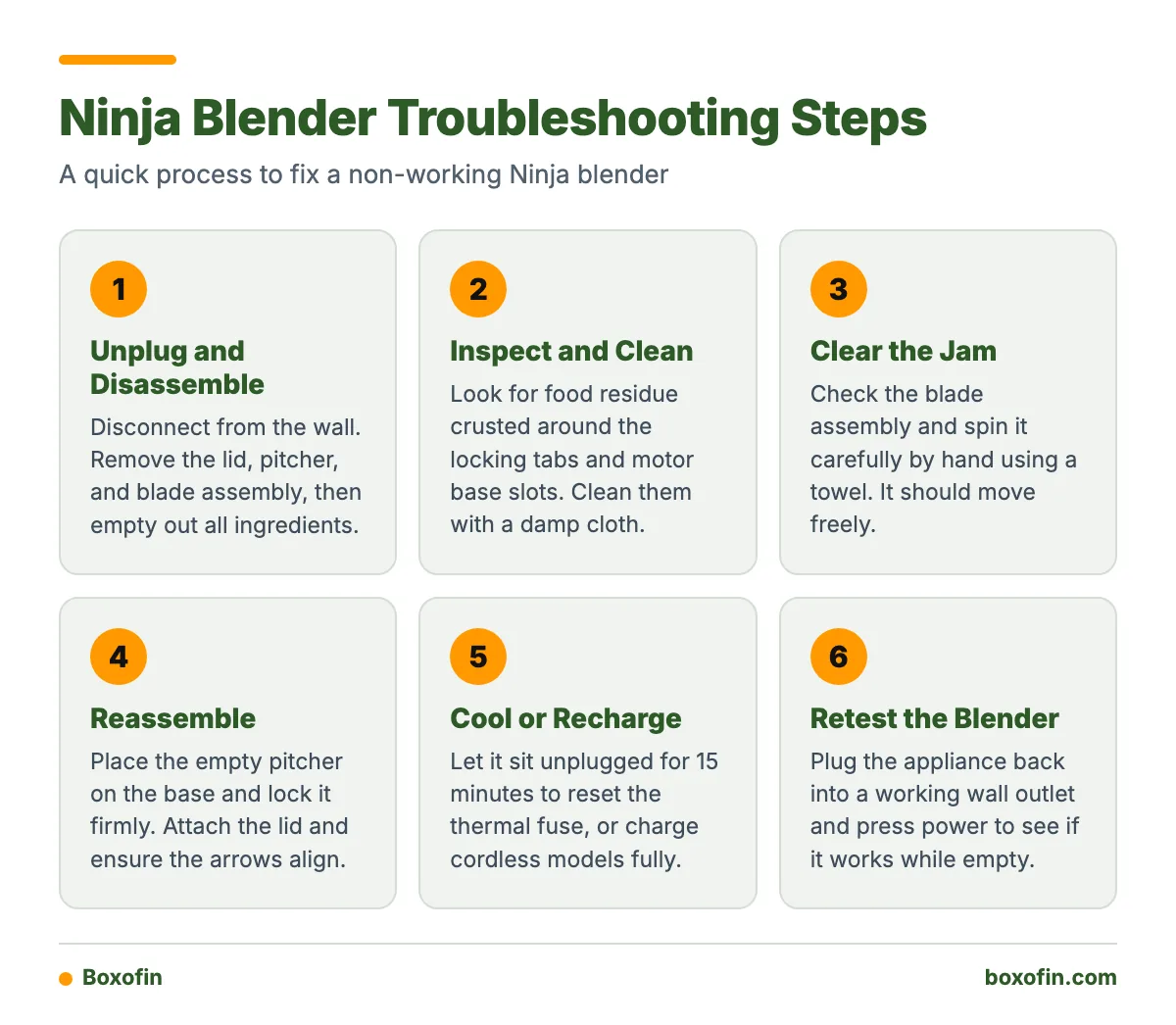
- Unplug: Disconnect the blender from the wall for safety.
- Disassemble: Remove the lid, pitcher, and blade assembly. Empty out all ingredients.
- Inspect: Look for food residue crusted around the locking tabs on the cup and the slots on the motor base. Clean them with a damp cloth.
- Clear the jam: Check the blade assembly. Spin it carefully by hand (using a towel). It should move freely.
- Reassemble: Place the empty pitcher onto the base. Lock it firmly. Attach the lid and ensure the arrows align perfectly.
- Cool: If the unit recently stopped mid-use, let it sit unplugged for at least 15 minutes to reset the thermal fuse.
- Recharge: If it is a cordless model, plug it in and wait for a solid green battery indicator.
- Retest: Plug the blender back into a working wall outlet and press power.
If the blender works while empty, the hardware is fine. The problem was likely how the ingredients were loaded or how the cup was locked.
Worked Example: Unlocked Cup vs. Frozen Overload
If your blender flashes a warning light, follow this logic to find the exact problem:
- Step 1: Remove the pitcher from the base entirely. Turn the base on. Does the light still flash exactly the same way?
- If Yes: The base sensors are dirty, or the control board has failed.
- If No: Proceed to Step 2.
- Step 2: Put the empty pitcher back on the base and lock the lid. Turn it on. Does it run normally?
- If Yes: The blender works. The ingredients you had inside were too thick or frozen, causing an overload.
- If No: The locking tabs on your specific pitcher or lid are worn down and failing to press the internal safety switch.
What should I do when my Ninja blender stops working during blending?
If your blender suddenly dies while actively running, unplug it immediately. A motor can stop temporarily when blades jam or the appliance is overloaded by thick or frozen ingredients. This is a built-in protection mechanism. The blender shuts off to prevent the internal copper wiring from melting.
How can I tell whether the cup, lid, or blade assembly is locked correctly?
Look for the small white arrows printed on the plastic components. The arrow on the lid must point directly to the arrow on the pitcher handle. Next, the pitcher must be rotated on the base until you hear an audible “click.” If the handle is slightly skewed, the internal switch remains open, and power cannot flow to the motor. If you try to blend and nothing happens, always twist the pitcher out and back in again to confirm the click.
Could frozen or thick ingredients be causing the Ninja blender to stop?
Yes, frozen fruit and thick mixtures frequently stall blades and trigger thermal protection. Advice about frozen ingredients is often vague. You cannot pack a blender cup entirely full of frozen strawberries and expect it to spin. The blades need liquid to create a vortex. Without enough water or milk, the frozen blocks wedge against the blades. The motor tries to turn, draws massive amounts of electrical current, and trips the overload sensor. Always layer your ingredients: liquids first, soft foods next, and frozen items on top.
How long should I let an overheated Ninja blender cool down?
You should let an overheated Ninja blender cool down for at least 15 to 30 minutes. The internal thermal fuse resets automatically, but only after the metal components return to a safe temperature. You must unplug the machine during this time. If you leave it plugged in and the fuse resets, the blender could suddenly turn on if the power button was left in the active position.
What should I do if the blender is charged but still will not start?
If your cordless Ninja blender indicates a full charge but refuses to start, check if it is still plugged into the wall. Owners report that some cordless models cannot be operated while connected to the charger. You must disconnect the USB-C cable completely before the motor will activate.
Battery limitations are a common issue. According to reviews for Ninja BC151WH Blenders, buyers frequently mention short battery life, failure to hold a charge, and devices stopping during use. Cordless Ninja blender reviews repeatedly report that battery life may only last roughly two to three uses in some portable units. If the lights show a full charge but drop to zero the moment you press blend, the internal battery cell has likely degraded. In this case, the battery cannot output the high amperage required to spin the motor under a load, and the unit must be replaced.

When should I stop troubleshooting and request a repair or replacement?
You should stop troubleshooting and contact customer support if you notice physical damage or signs of an electrical short. A burning smell, smoke, a damaged cord, a cracked container, exposed wiring, or repeated automatic shutdown is a reason to stop using the blender immediately rather than continue testing it.
From the Shop
When a blender motor fails permanently, it rarely does so quietly. You will usually hear a loud grinding noise or smell an acrid, metallic odor. This happens when the internal carbon brushes wear out or the motor windings short together. If you clean the locks, let the unit cool for an hour, use a known-good outlet, and still get zero response or a burning smell, the motor is dead. Do not attempt to open the motor base yourself, as there are no user-serviceable parts inside.
If your appliance is under warranty, reach out to Ninja support. Have your exact model number, serial number, and proof of purchase ready. Customer service sometimes replaces defective units promptly if the failure is clearly a manufacturing defect rather than normal wear and tear.
What do owners say?
Owners like
- Blends ordinary smoothies and everyday ingredients effectively when correctly assembled.
- Some owners report years of reliable use with older Ninja blender models.
- Customer service sometimes replaces defective units promptly.
- The appliances are considered useful for frequent smoothies and basic blending.
Common complaints
- Cordless models may stop holding a charge or require charging after every use.
- Frozen fruit and thick mixtures can jam the blades or stall the blender.
- Some owners report repeated replacements or failure after only a few uses.
- Users frequently describe Ninja blenders as very noisy.
- Some owners report leaking seals, cracked containers, or parts that become unusable.
Summarised from owner reviews and long-term user reports; individual experiences vary.
Independent coverage reports recurring complaints about Ninja appliance noise, leakage, premature failure, and long-term durability. To learn more about broad customer trends, you can read Common Customer Praises (And Complaints) About Ninja Kitchen Appliances and How Do Customers Really Feel About Ninja Kitchen Appliances?.
Frequently Asked Questions
how to.fix ninja blender not working?
Unplug the blender, remove the pitcher, and clean out any thick ingredients. Inspect the locking tabs on the lid and pitcher to ensure they are not broken. Reassemble the unit, align the arrows perfectly, plug it into a tested wall outlet, and try again.
ninja blender not working red light flashing?
A flashing red light indicates that the motor is experiencing too much resistance or the cup is not locked in correctly. Remove the pitcher, verify nothing is jamming the blades, and lock the lid firmly until it clicks into the base.
ninja blender not working light blinking?
A blinking light usually points to an alignment error with the safety switches. Take the lid off and put it back on, making sure the printed arrows align. For cordless models, a blinking light often means the battery is depleted and requires a full charge.
what to do when your ninja blender stops working?
If it stops suddenly mid-blend, the thermal protection switch has likely tripped. Turn the machine off, unplug it from the wall, and let it cool down for at least 15 to 30 minutes before attempting to use it again.
why is ninja blender not turning on?
The blender will not turn on if the electrical outlet is dead, the thermal fuse is tripped, or the pitcher is not pressing down on the internal safety switches. Confirm the outlet works and ensure the pitcher handle is securely twisted into the locked position.
why is my ninja blender not working?
The most frequent reasons include misaligned safety locks, an overloaded motor caused by a lack of liquid with frozen ingredients, or a dead battery in portable models. Clear the ingredients, check the assembly, and let the motor cool.
Sources