Lock the container and lid fully onto the motor base, or a Ninja blender won’t run at all. Beyond that, match the blade to the container, add ingredients in the recommended order, and pick a manual speed or Auto-iQ program made for that container. Each step is covered below, plus fixes for common problems.
Quick answer
Lock the container and lid in place, load fresh produce first and ice or frozen food last, then press an Auto-iQ program or a manual speed. If nothing happens, check the locks, the program-to-container match, and whether the motor needs to cool down.
- Best for hands-off drinks: Auto-iQ, because it times and stops itself
- Best for control: manual speeds or Pulse
- Models differ. Auto-iQ buttons and compatible attachments vary, so check your model number first.
- Ingredient order matters: fresh produce, leafy greens, liquids, powders or nut butters, then ice and frozen items.
- Auto-iQ programs work only with certain containers. The wrong match can show ERR.
- Manual speeds run until you stop them. Auto-iQ stops on its own.
- If food sticks near the blade, add liquid and use the program meant for that container.
- Only models with a processing bowl or chopping blade can act as a food processor.
- How do you use a Ninja blender for the first time?
- How do you blend with a Ninja blender?
- What order should ingredients go into a Ninja blender?
- How do you use Ninja blender Auto-iQ?
- How do you use a Ninja blender 3-in-1 system?
- What can you use a Ninja blender for?
- Can you use a Ninja blender as a food processor?
- Why is my Ninja blender not blending?
- How do you clean a Ninja blender safely?
- What do owners say?
- Frequently Asked Questions
How do you use a Ninja blender for the first time?
Start by finding your model number, then wash the removable parts, assemble the unit, and check that everything locks. Many guides treat all Ninja models as the same. They are not, and knowing your model saves guesswork later.
Identify your model, container, and blade
The model number is usually on the base or in the manual. Look at the control panel next. Some models have Low, Medium, and High. Others have only Low and High. Some have an IQ/MANUAL button, and some have Pulse. Then check the containers in the box. You may have a full-size pitcher, single-serve cups, a processing bowl, or a mix. Each container pairs with its own blade assembly.
Wash and assemble
- Unplug the base. Handle blade assemblies by the shaft or top, never the edges. They are sharp.
- Wash the container, lid, and blade assembly before first use. Follow your manual for dishwasher guidance.
- Fit the blade assembly into the container as shown in the manual.
- Set the container on the motor base and turn or press it until it seats.
- Place the lid on and lock it.
- Plug in the base.
Respect capacity limits
Every container has a MAX fill line. Stay below it. Overfilling forces the motor to work harder, can push liquid out of the lid, and leaves food unblended. Hot liquids need extra care, so follow your manual’s hot-food rules.
How do you blend with a Ninja blender?
Load the container, lock the lid, set the container on the base, and press a speed or an Auto-iQ program. Wait for the blades to stop fully before you lift the container.
- Add ingredients in the right order (next section).
- Lock the lid.
- Set the container on the base and make sure it seats.
- Press Low, Medium, or High, or choose an Auto-iQ program.
- Stop the blender if you used a manual speed. It will keep running until you do.
- Wait for the blades to stop, then remove the container.
Auto-iQ, manual speed, and Pulse compared
| Control | How it runs | Who stops it | Best for |
|---|---|---|---|
| Auto-iQ | Timed mix of pulsing, blending, and pausing | Stops automatically when finished | Smoothies, frozen drinks, and repeat tasks |
| Manual Low/Medium/High | Runs continuously | You | Sauces, soups, and fine-tuning texture |
| Pulse | Short bursts, user-controlled | You, by releasing or tapping | Chopping, breaking up clumps, and rough textures |
On some models you hold Pulse down. On others you tap it in short touches. Your manual will say which.
What order should ingredients go into a Ninja blender?
Ninja recommends this order: fresh fruit or vegetables first, leafy greens or herbs next, liquids or yogurt after that, seeds, powders, or nut butters next, and ice or frozen ingredients last.
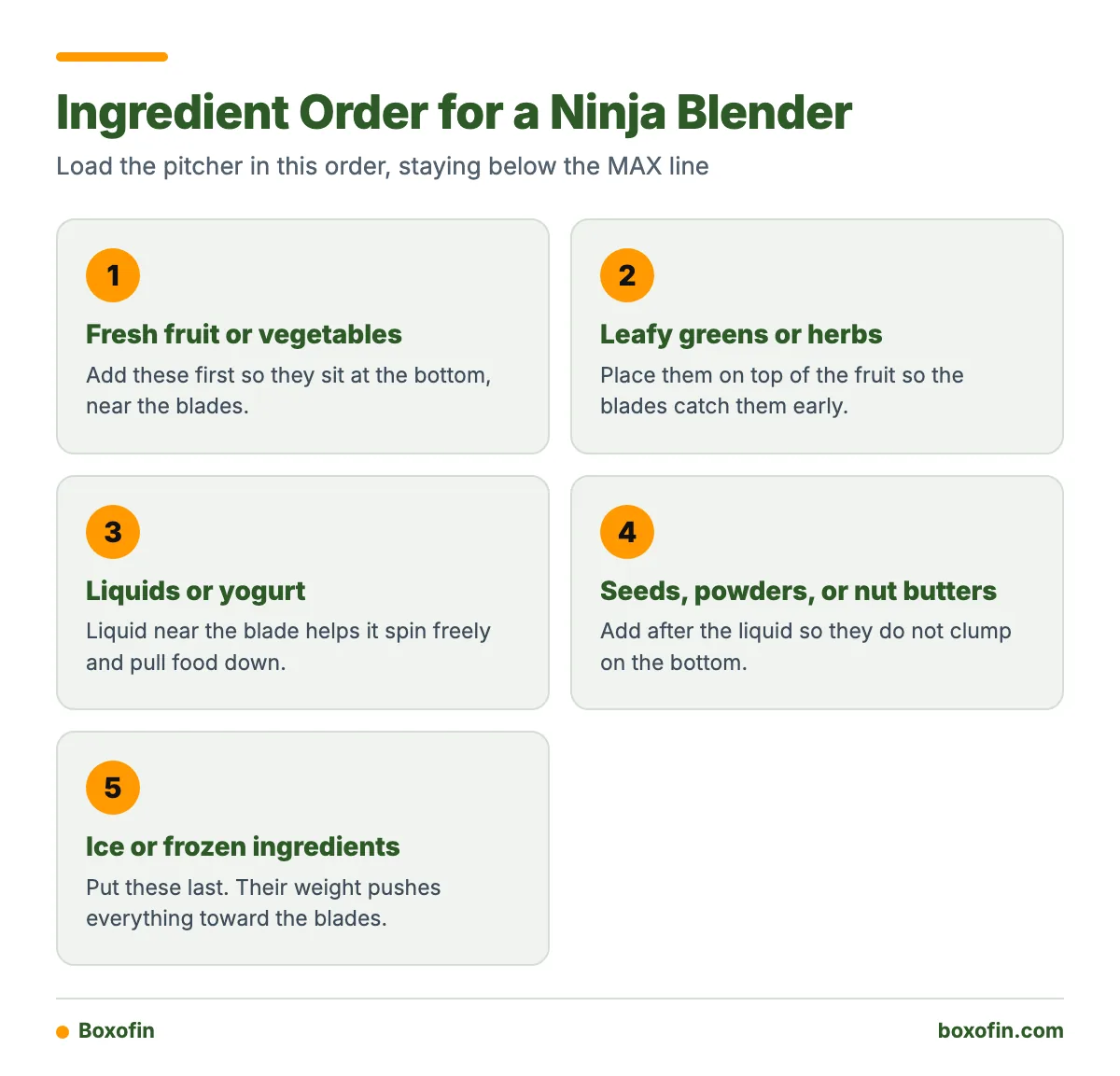
The reasoning is simple. Liquid near the blade helps it spin freely and pull food down. Ice on top adds weight that pushes everything toward the blades. Frozen items at the bottom, with no liquid around them, can jam the blade and leave dry pockets.
Worked Example: A Simple Smoothie
Here is how the order looks in a full-size pitcher, based on Ninja’s recommended loading sequence:
- Fresh fruit: one banana, sliced. It sits at the bottom, near the blades.
- Leafy greens: a handful of spinach. It goes on the fruit so the blades catch it early.
- Liquid and yogurt: milk and a scoop of yogurt. These coat the lower layers and let the blades move.
- Powder or nut butter: a spoon of peanut butter or protein powder, added after the liquid so it does not clump on the bottom.
- Frozen items: frozen berries and a few ice cubes on top. Their weight pushes the mix down into the blades.
Keep the total below the MAX line, lock the lid, and run a smoothie-style Auto-iQ program if your model has one. Otherwise run High and stop when the mix looks smooth.

How do you use Ninja blender Auto-iQ?
Load the container, lock it on the base, and press the Auto-iQ program you want. The program runs a timed mix of pulsing, blending, and pausing, then stops by itself. You do not need to watch the clock.
Match the program to the container
Auto-iQ programs are built for specific containers. If the base does not detect the right attachment, the display may show ERR and the program will not run. Only the controls enabled for the attached container will work. A pitcher program will not run with a single-serve cup, and the reverse is also true.
Switching between Auto-iQ and manual
On supported models, press IQ/MANUAL to toggle between the two modes. If a button seems dead, try the toggle first. Ninja’s BL640 Nutri Ninja Blender DUO FAQs show how one Auto-iQ model handles this.
- If you want a hands-off smoothie or frozen drink, use the Auto-iQ program for your container.
- If you want control over texture, use manual Low, Medium, or High and stop it yourself.
- If you want chunky chopping or need to break up clumps, use Pulse.
- If you see ERR, check that the program matches the attached container.
How do you use a Ninja blender 3-in-1 system?
Pick the container for the job, fit its matching blade, and use the controls that container supports. A 3-in-1 system usually combines a pitcher with other attachments, such as single-serve cups or a processing bowl. Each attachment has its own blade and its own allowed programs.
- Pitcher: larger batches, such as smoothies for a family, frozen drinks, and sauces.
- Single-serve cup: one portion. Many owners blend straight into a cup that doubles as a to-go bottle. Follow the manual on lids and fit.
- Processing bowl: chopping, mixing, and dough on models that include it.
For a system with a dedicated bowl, see the SS300 / SS350 Foodi Power Blender & Processor System FAQs. It explains which parts go with which job.
What can you use a Ninja blender for?
Most Ninja blenders handle smoothies, frozen drinks, sauces, soups, and purées. Models with processing attachments can also chop, mix dough, and make spreads such as hummus. This table matches common tasks to the right setup.
| Task | Container | Blade | Control |
|---|---|---|---|
| Smoothie | Pitcher or single-serve cup | Blender blade for that container | Smoothie Auto-iQ or High |
| Crushing ice | Pitcher | Blender blade | Ice or frozen-drink Auto-iQ, or Pulse then High |
| Frozen drink | Pitcher | Blender blade | Frozen-drink Auto-iQ or High |
| Purée or sauce | Pitcher or processing bowl | Blender or chopping blade | Purée program or Low to High |
| Chopping | Processing bowl | Chopping blade | Chop program or Pulse |
| Dough | Processing bowl | Dough blade | Dough program, if your model has one |
| Spread (hummus, nut butter) | Processing bowl or pitcher | Per manual | Pulse and manual speeds, with scraping |
Not every model has every row. Use this as a map, then confirm the exact container and program in your manual.

Can you use a Ninja blender as a food processor?
Only if your model includes processing parts. Some Ninja systems have a processing bowl, chopping blade, discs, and Auto-iQ functions such as Chop, Purée, Dough, and Disc, but availability varies by model. A blender-only model has none of these.
Do not try to chop dense food or knead dough in a standard pitcher. The shape and blade are not designed for it, and results are poor. Ninja’s BN600 Professional Plus Food Processor FAQs show what a dedicated processor with Auto-iQ offers.
- If your box has a bowl with a chopping blade or discs, you can process food.
- If you only have a pitcher and cups, stay with blending and use Pulse for rough chopping of soft items.
Why is my Ninja blender not blending?
Most cases come down to a lock problem, a program mismatch, stuck food, or a hot motor. Work through this list in order.
How do you get a Ninja blender to work?
- Power: Confirm the plug is firmly in the outlet and the outlet works.
- Container alignment: Lift the container off and set it back until it seats on the base.
- Lid locking: Make sure the lid is fully locked. A half-closed lid keeps the motor off.
- Program match: Make sure the selected program fits the attached container. A mismatch can show ERR.
- Mode: Press IQ/MANUAL if your model has it and the buttons seem unresponsive.
- Blockage: If the motor hums but the blades do not turn well, stop. Remove the container and check for jammed food.
- Cooldown: If the motor stopped mid-run, it may have overheated. Unplug it and let it cool, following your manual’s wait time.
What if ingredients stay unblended?
Add liquid. Ninja’s guidance is that liquid usually frees ingredients stuck around the blade assembly. Then use the program meant for that container. Other fixes help too:
- Cut hard produce into smaller, even pieces.
- Pulse a few times to break up clumps, then blend.
- Stop, unplug, and scrape the sides with a spatula. Never put a spatula in a running blender.
- Reload in the right order next time, with liquid below the frozen items.
How do you clean a Ninja blender safely?
Unplug the base first, handle blades by the shaft, and wash parts with warm, soapy water or as your manual allows. Never submerge the motor base.
- Unplug the unit and wait for the blades to stop.
- Remove the container from the base and take off the lid.
- Carefully separate the blade assembly if your model allows it. Do not touch the cutting edges.
- Wash the container, lid, and blade assembly. Check your manual to see which parts can go in the dishwasher.
- Clean the seal or gasket and any narrow gaps with a soft brush. Food hides there.
- Wipe the base with a damp cloth. Dry everything before storing.
For a quick rinse between uses, many owners blend warm water with a drop of dish soap, then rinse. Confirm that your manual allows it for your container.
What do owners say?
Owners like
- Strong blending performance for smoothies and frozen drinks
- Convenient one-touch Auto-iQ programs
- A useful variety of cups, pitchers, bowls, and processing attachments on combination systems
- Versatility for drinks, sauces, purées, chopping, and dough on models with food-processing accessories
Common complaints
- Blade assemblies, seals, and narrow spaces can be hard to clean thoroughly
- The blender will not start when the container or lid is not fully locked
- Program and attachment compatibility can be confusing across different models
- Ingredients may stay stuck without enough liquid or the correct loading order
Summarised from owner reviews and long-term user reports; individual experiences vary.
Frequently Asked Questions
How do you use a Ninja blender?
Fit the correct container and blade onto the base, add ingredients in the recommended order, and lock the lid. Then pick a manual speed or an Auto-iQ program made for that container. Wait for the blades to stop before you open it.
How to use Ninja blender Auto-iQ?
Lock the container on the base and press the Auto-iQ program you want. It runs a timed mix of pulsing, blending, and pausing, then stops on its own. If ERR appears, the program likely does not match the attached container.
How to use Ninja blender 3-in-1?
Choose the container for the task, such as the pitcher, a single-serve cup, or a processing bowl. Fit its matching blade and use only the controls that container supports. Check your manual for which programs go with which attachment.
What to use a Ninja blender for?
Smoothies, frozen drinks, sauces, soups, and purées are the main uses. Models with processing attachments can also chop, mix dough, and make spreads like hummus.
How to get a Ninja blender to work?
Check the plug, reseat the container, and lock the lid fully. Make sure the program matches the container and try the IQ/MANUAL button if your model has one. If the motor stopped mid-run, let it cool before trying again.
How to blend with a Ninja blender?
Load fresh produce first, then greens, liquids, powders or nut butters, and ice or frozen items last. Stay under the MAX line, lock the lid, and press a speed or Auto-iQ program. Stop manual speeds yourself.
Can I use a Ninja blender as a food processor?
Only on models with a processing bowl, chopping blade, or discs. Blender-only models are not built for dense chopping or dough, so use Pulse for light chopping of soft foods.
Why isn’t my Ninja blender blending?
The usual causes are an unlocked container or lid, a program that does not match the container, food stuck at the blade, or a hot motor. Add liquid to free stuck ingredients and use the program meant for that container. If it still fails, check your manual or contact Ninja support.
Sources