A Ninja blender usually stops spinning because the pitcher, lid, or blade assembly is not locked in place, the blades are jammed, the motor overheated, or the outlet has no power. Unplug it, empty it, let it cool for about 15 minutes, then reassemble it and test again. This guide shows you how to tell which problem you have and what to do next.
Quick answer
Unplug the blender and empty the pitcher. Clear anything stuck on the blades and wait about 15 minutes. Reassemble with the arrows aligned, plug into a working outlet, and retry with a small, liquid-rich load. If it still hums, smells burnt, or stays dead, stop and contact Ninja.
- Best for no lights: check the outlet, plug, and breaker first
- Best for humming or stalling: unplug, empty, and cool the motor
- Alignment, power, jams, and overheating cause most “not spinning” cases.
- The BL500 manual says to unplug, empty, clear the blades, and cool the unit for about 15 minutes.
- Overfilling and frozen chunks are the most common reasons blades stall.
- Only do external checks while unplugged. Never open the motor base.
- Burning smell, constant humming, or an overload light that will not clear points to a fault.
- Quick Diagnosis Table
- Why Is My Ninja Blender Not Turning On?
- How Can I Check the Pitcher, Lid, and Blades Are Locked?
- Why Does It Make Noise but the Blades Do Not Rotate?
- Could an Overloaded or Frozen Mixture Be the Cause?
- How Do I Reset a Ninja Blender After It Overheats?
- What If It Flashes an Error or Overload Light?
- Why Does It Work on Low but Stall on High or Pulse?
- Full-Size, Personal, and Cordless Models
- Five-Minute Checklist
- Is It Safe to Clear a Jam?
- When to Contact Ninja Support
- What Do Owners Say?
- Frequently Asked Questions
Quick Diagnosis Table
Start with what the blender is doing. The symptom points to the likely cause.
| Symptom | Likely cause | Action |
|---|---|---|
| No lights at all | No power, loose plug, tripped breaker, blown fuse | Test another outlet and check the breaker |
| Lights on, nothing happens | Pitcher or lid not seated | Remove, realign arrows, relock |
| Flashing light | Assembly not detected or overload | Unplug, empty, cool, reassemble |
| Humming, blades still | Jammed blades, stuck motor, or failed capacitor | Unplug and clear the load; if it persists, call support |
| Stalls mid-blend | Overfilled or frozen load | Reduce, add liquid, pulse |
| Burning smell | Overheating or electrical fault | Unplug and stop using it |
| Works sometimes | Worn plug, controls, or internal fault | Test the outlet, then contact support |
Why Is My Ninja Blender Not Turning On?
Most often it has no power or does not sense a correct assembly. The BL500 manual lists a loose plug, a blown fuse, a tripped circuit breaker, and a switched-off control as causes of a motor that will not start (BL500 User Manual and Troubleshooting Guide).
- Push the plug in fully.
- Plug a lamp into the same outlet to confirm it works.
- Check for a tripped breaker, especially on kitchen circuits shared with a microwave or kettle.
- Look at the cord for cuts or crushed spots.
If the outlet is fine and the unit is properly assembled but still dead, the control panel or motor may have failed. Owners report units that lose control-panel function or stop turning on after months of use.
How Can I Check Whether the Pitcher, Lid, and Blade Assembly Are Properly Locked?
Treat each part as its own failure point. Many blenders will not run if any one of them is off.
- Pitcher arrows: The BL500 manual says to install the pitcher and lid with the arrows aligned. Lift the pitcher off and set it down again until it seats flat.
- Lid position: A lid that is turned out of place can block the interlock. Remove it and lock it on again.
- Ready light: The manual says it should be solid green when the unit is correctly assembled. No green light means the unit does not think it is assembled.
- Blade assembly: Check that it is screwed tight to the pitcher base and the seal is seated. Look for food or debris under the base where it meets the motor.

Why Does My Ninja Blender Make Noise but the Blades Do Not Rotate?
The motor is getting power but something stops the blades. That could be a jam, a worn coupler, or a stuck motor. Repair discussions name a stuck motor or a failed run capacitor as possible causes when a blender hums without turning (Ninja CT682 repair discussion).
Do this first: unplug it, empty the pitcher, and turn the blade assembly by hand using the pitcher only. If the blades will not move, a jam is likely. If they turn freely, the fault is probably in the base.
Signs of a worn coupler, gear, or bearing include grinding, a plastic burning smell, and blades that spin loosely without pulling food. Those are not home repairs. Contact support.
Could an Overloaded or Frozen Mixture Be Stopping the Blades?
Yes. A Ninja NJ600 discussion names overfilling as a common reason powered-on blades fail to rotate (Why Are the Blender Blades Not Rotating? Ninja NJ600). Owners also report that thick or frozen ingredients make units stall, and some say thawing fruit helps.
If the pitcher is above the max line: unplug, scoop out half, and retry.
If you see large frozen chunks: unplug, empty, and break them up or let them thaw a few minutes.
If the mix is a thick paste: add liquid before restarting.
If the motor feels hot: wait 15 minutes before any retry.
Worked example: a frozen smoothie that stalled
- Unplug the base and take off the pitcher.
- Pour out the contents into a bowl.
- Break up fruit clumps. Let large frozen pieces sit a few minutes.
- Add liquid to the pitcher first, then soft items, then frozen fruit on top.
- Stay well below the max line.
- Plug in and use short pulses, a few seconds each, before a longer run.
How Do I Reset a Ninja Blender After It Overheats?
Unplug it and let it rest. The BL500 manual says to unplug the unit, remove and empty the container, clear food jamming the blades or attachments, and allow the unit to cool for approximately 15 minutes before reinstalling and reconnecting it.
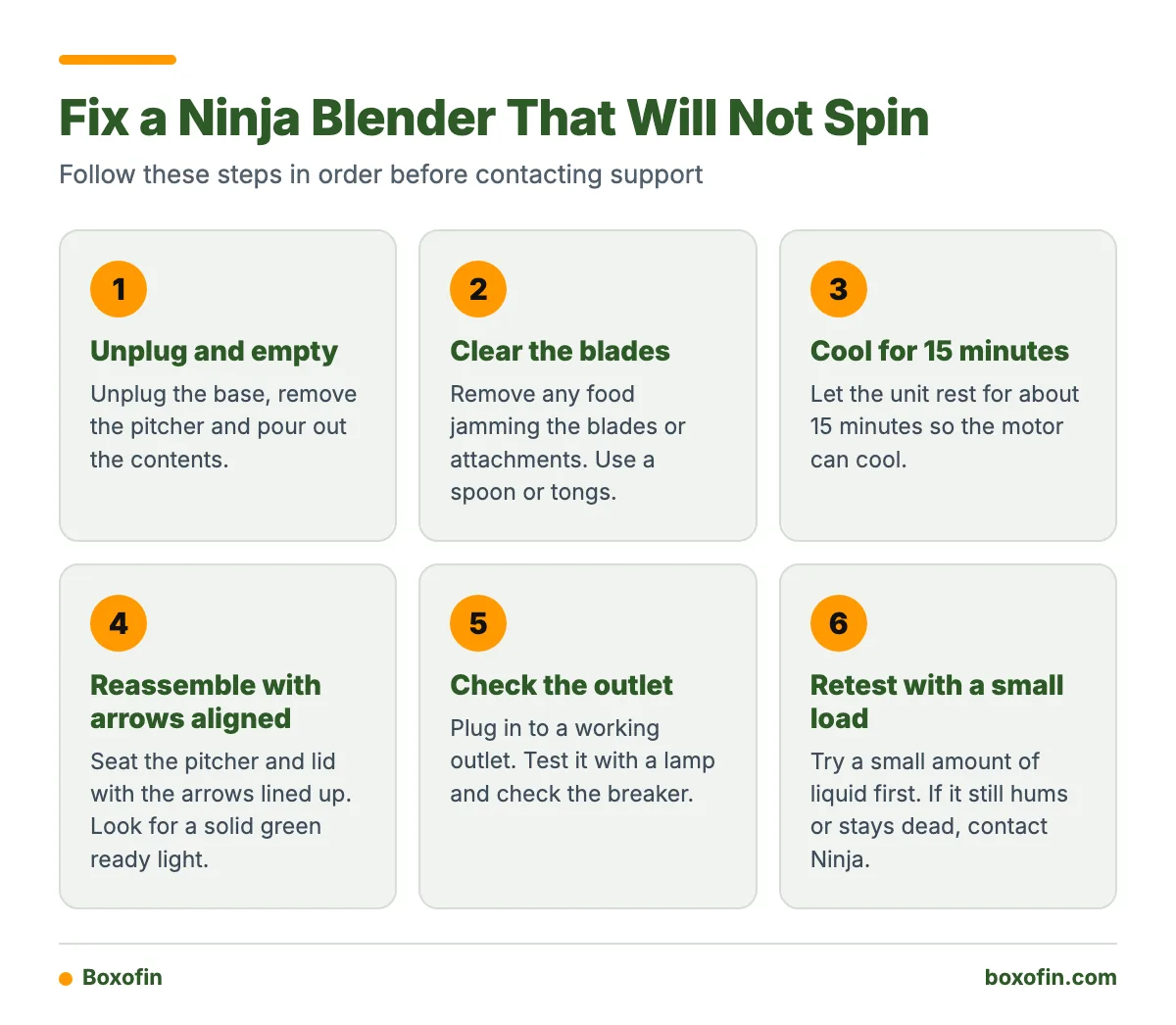
After the wait, reassemble, plug in, and test with a small load of liquid. Do not restart with the same thick mixture. If the unit stops again quickly, the load is probably too heavy or there is a fault.
What Should I Do If the Ninja Blender Flashes an Error or Overload Light?
Treat it as a stop sign. Unplug, empty, cool for 15 minutes, and realign the pitcher and lid. Meanings of flashing lights vary by model, so look up your light pattern in your own manual rather than guessing.
Some owners report a unit that stays in an overload state even after the visible obstruction is gone. If yours does after a full cool-down and a clean reassembly, stop and contact support.
Why Does the Blender Work on Low Speed but Stall on High or Pulse?
High speed asks the motor for more power. A heavy or poorly mixed load that survives low speed can stall once the blades speed up. Frozen chunks near the blades are the usual cause.
- Add liquid until the contents move freely.
- Cut ingredients smaller.
- Pulse a few times before running continuously.
- Use less per batch.
If it stalls on every speed, even with water only, suspect a fault rather than the recipe.
Differences Between Full-Size, Personal-Cup, and Cordless Models
Reset steps are similar, but the interlocks differ. Always confirm in your model’s manual.
| Model type | Likely interlock or indicator | Safe reset steps |
|---|---|---|
| Full-size pitcher | Aligned pitcher and lid arrows; ready light (solid green on the BL500) | Unplug, empty, cool 15 minutes, realign, retest |
| Personal cup | Cup must seat fully on the base; check your manual for indicators | Unplug, remove cup, clear blades, reseat, retest with less |
| Cordless | Battery charge and cup seating | Remove cup, charge fully, reseat, retest with liquid-rich load |

Cordless units deserve a caution. Some owners report repeated durability, battery, or jam-related problems with cordless Ninja Blast models, particularly with frozen ingredients. Thaw fruit and add liquid first.
Five-Minute Checklist
- Unplug the blender.
- Empty the pitcher or cup.
- Inspect the blades, seal, and base for food or debris.
- Cool for 15 minutes if the motor felt warm or stopped mid-blend.
- Reassemble with the arrows aligned and the lid seated.
- Test the outlet with another device.
- Retry with a small amount of liquid, then add food.
Is It Safe to Remove a Jammed Ingredient or Inspect the Blade Assembly?
Yes, but only with the unit unplugged, and with care. Blades stay sharp. Use a spoon or tongs to move food, and hold the pitcher by the handle, not the blade end.
Do not open the motor base, poke inside the socket, or test electrical parts. Never run the base without the pitcher in place. Gears, bearings, and capacitors need a qualified technician.
When Should I Stop Troubleshooting and Contact Ninja Support?
Stop when the basic checks fail or you see a danger sign.
- Burning smell or smoke
- Constant humming with still blades after clearing and cooling
- No response on a verified working outlet
- An overload light that will not clear
- A damaged cord or plug
Have your model number and purchase date ready. Check the warranty in your manual first. Some owners report that replacement support was provided after an early failure. If the unit is old and the repair cost is close to a new one, replacing it may make more sense.
What do owners say?
Owners like
- Strong blending of everyday smoothies and frozen ingredients when the load is balanced
- Useful versatility from interchangeable pitcher, cup, and food-processing attachments on compatible models
- Dependable operation for frequent use over several years, according to many owners
- Replacement support is sometimes provided after an early failure or persistent overload issue
Common complaints
- Thick or frozen mixtures can stall, jam, or require thawing before blending
- Some units become loud or stop blending effectively before eventually losing power
- Control panels that stop responding and motors that no longer start
- Cordless models draw recurring complaints about battery life, charging communication, and durability
- Some units stay in an overload state even after the visible obstruction is removed
Summarised from owner reviews and long-term user reports; individual experiences vary.
Frequently Asked Questions
How to fix Ninja blender not spinning?
Unplug it, empty the pitcher, and clear food from the blades. Let it cool for about 15 minutes, then reassemble with the arrows aligned. Plug into a working outlet and test with a small amount of liquid. If it still does not spin, contact Ninja.
Ninja blender not spinning reddit: what do owners usually find?
Owner discussions often point to overfilling, frozen ingredients, or a pitcher that is not seated. Some report that thawing fruit helped. Others had worn-out motors after months or years of use.
Why is my blender not spinning?
A blender usually does not spin because of a jam, a bad connection, a part that is not locked in place, an overheated motor, or a motor fault. Unplug it and check the simple causes first.
Why is my Ninja blender not spinning?
Check the pitcher and lid alignment, the ready light, and the load size. A thick or frozen load can stall the blades. If the motor hums with nothing in the pitcher, a stuck motor or failed capacitor is possible, and that needs service.
Why is Ninja blender not turning on?
Check the plug, outlet, breaker, and fuse. Then confirm the pitcher and lid are seated so the ready light can turn solid green. If none of that works, the controls or motor may be faulty.
Why is my Ninja blender not working?
The cause is usually power, assembly, a jam, or overheating. Use the symptom table above to match what you see. A burning smell, grinding, or an overload light that will not clear means stop and call support.
Sources