
Ninja owners with a blender that will not blend, stalls, or leaves chunks usually have a loading problem, not a broken machine. The most common causes are too little liquid, a mixture that is too thick, blocked blades, the wrong ingredient order, a vessel that is not locked in place, a low battery, or overheating. This guide helps you find which one you have and fix it safely.
Quick answer
Turn the blender off, then add liquid up to your model’s minimum line so it covers the blades. Load liquid first and frozen food last. Remove the vessel from the base before you clear any jam. Then check the lights, lock, and battery.
- Ninja lists a 6-ounce minimum liquid level for Blast portable models, and the liquid should cover the blades.
- Load order matters: liquid, fresh produce, greens, powders, then ice or frozen food.
- Always power off and remove the vessel before using a utensil on stuck food.
- Flashing white means misalignment. Solid red means charge. Flashing orange means blocked blades (on BC100/BC150).
- Repeated shutdowns, a worn lock, or a seized blade point to service, not more tries.
- Quick diagnosis: what is your blender doing?
- Why is my Ninja blender not blending at all?
- Why is my Ninja blender blending only the ingredients at the bottom?
- What ingredient order helps a Ninja blender blend better?
- Why is my Ninja blender not blending frozen fruit or ice?
- How do I safely clear a blockage from the Ninja blades?
- What do flashing white, red, orange, or purple lights mean?
- Why does my Ninja blender stop during blending?
- Why is my Ninja blender not blending smooth?
- When should I stop troubleshooting and contact Ninja support?
- What do owners say?
- Frequently Asked Questions
Quick diagnosis: what is your blender doing?
Start with what you see and hear. The table below matches each symptom to its likely cause and first fix. Light meanings come from Ninja’s support pages for BC100/BC150 and related portable models, so check your own manual if you own another model.
| Symptom | Likely cause | First fix |
|---|---|---|
| No lights, no response | Dead battery or vessel not seated | Charge the unit, then twist the vessel fully into place |
| Flashing white | Vessel and motor base not aligned | Remove, realign, and lock again |
| Solid red | Charging needed (BC100/BC150) | Plug in and charge |
| Flashing orange | Blocked blades (BC100/BC150) | Power off, remove vessel, clear the jam |
| Motor hum, nothing moves | Mixture too thick or blades jammed | Stop, add liquid, free the blades |
| Only the bottom blends | Too little liquid or wrong order | Add liquid to the minimum line and reload |
| Gritty or pulpy texture | Short blend, big pieces, low liquid | Add liquid, cut food smaller, blend again |
Why is my Ninja blender not blending at all?
Most often the blender does not think it is assembled, or it has no charge. Ninja models use a safety lock. If the vessel, lid, or blade assembly is not seated, the motor will not run.
- Remove the vessel and check that the blade assembly is screwed on tight.
- Check the lid and the rim for food or water that stops a full seat.
- Line up the vessel with the base and twist until it locks. On cited portable models, flashing white means this step failed.
- On cordless models, charge the unit fully before you try again.
Why is my Ninja blender blending only the ingredients at the bottom?
The blades are spinning, but the food above them is not falling down. This is called cavitation, or an air pocket. It happens when the mix is too thick or there is too little liquid.
How much liquid should I add when my Ninja blender is stuck?
On Blast models, Ninja’s support pages list a 6-ounce minimum, with liquid at or above the line and covering the blades (BC100/BC150 FAQs). For Blast Max, Ninja says to add liquid to the 6-ounce line before solids. If ingredients still will not mix, it suggests adding 1 tablespoon to one-quarter cup more liquid between blend cycles (BC200/BC250 FAQs).
Ninja also advises shaking the portable blender during blending. You can also start it briefly upside down, then turn it upright, so food reaches the blades. Do this with a closed, locked vessel and keep your hands clear of the base.
What ingredient order helps a Ninja blender blend better?
Put the wet things at the bottom and the hard, cold things on top. Ninja’s recommended order for Blast Max is below, and it works as a good habit for other models too.
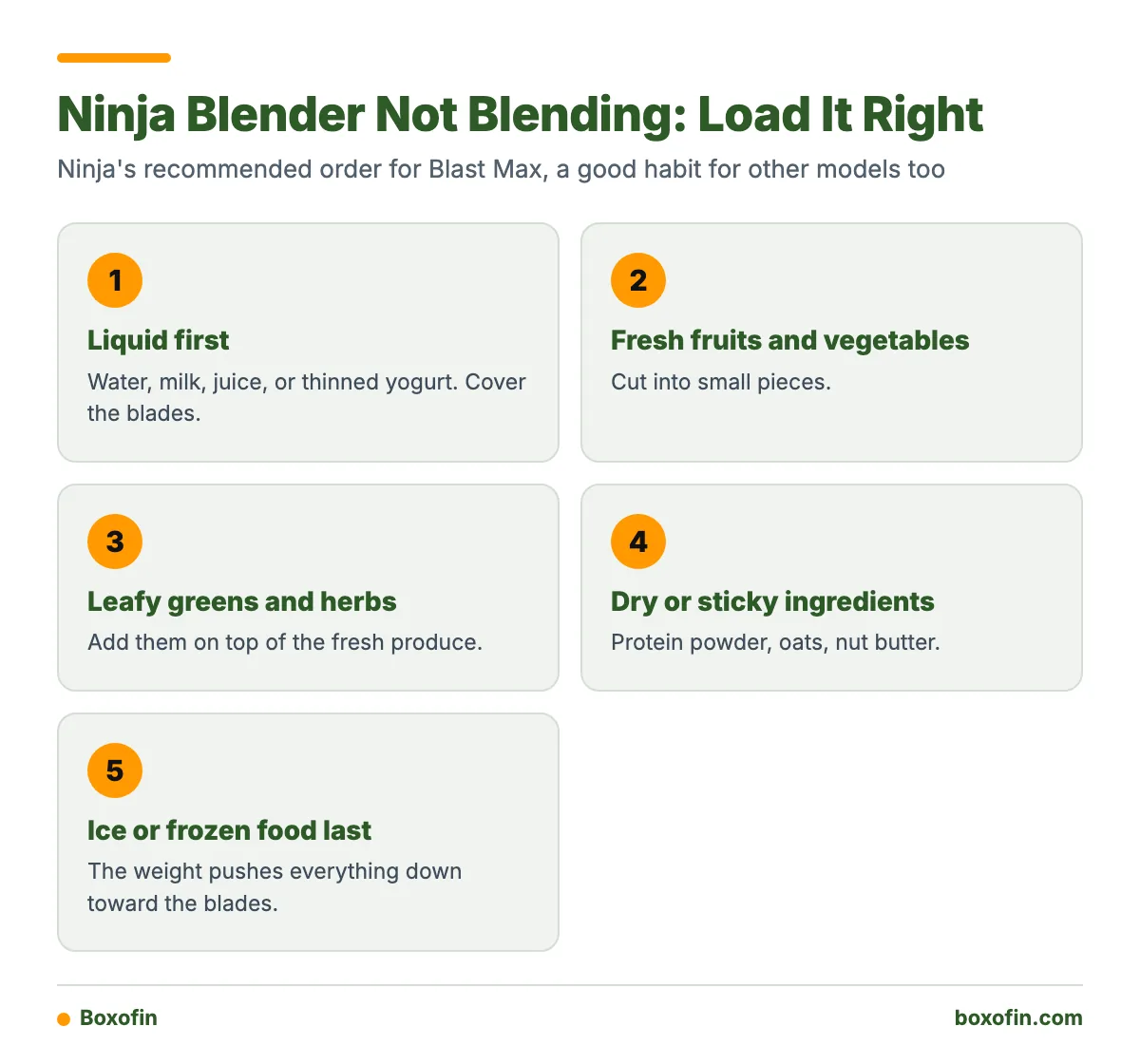
- Liquid first. Water, milk, juice, or yogurt thinned with liquid. Cover the blades.
- Fresh fruits and vegetables. Cut into small pieces.
- Leafy greens and herbs.
- Dry or sticky ingredients. Protein powder, oats, nut butter.
- Ice or frozen food last. The weight pushes everything down toward the blades.
- If powder sits dry on top, add a splash of liquid and shake with the unit off.
- If nut butter sticks to the walls, add liquid and stir before locking in the lid.
- If the mix is thick like paste, add liquid in small steps, not all at once.

Why is my Ninja blender not blending frozen fruit or ice?
Frozen chunks that are too big, too many, or loaded too early will jam the blades. Owner reports often describe this problem with frozen fruit and thick mixes.
- Let frozen fruit sit for a few minutes so the edges soften.
- Break up clumps before they go in.
- Use fewer frozen pieces and more liquid.
- Do not fill past the max line. Overfilling leaves no room for food to move.
- Add ice last, never first.
How do I safely clear a blockage from the Ninja blades?
Turn the blender off, unplug it if it is plugged in, and remove the vessel from the motor base before you touch anything. Never put a spoon or fingers into a vessel that is attached to a powered base. Blades are sharp even when still.
- Power off and detach the vessel.
- Remove the lid and pour out some contents if it is overfull.
- Use a long spoon or spatula to loosen packed food around the blades. Handle the blade assembly with care.
- Add liquid to the minimum line or higher.
- Lock everything back in place and try a short pulse.
What do flashing white, red, orange, or purple lights mean?
On the cited portable models, flashing white means the vessel and motor base are not aligned. On BC100/BC150, solid red means the battery needs charging, and flashing orange means the blades are blocked. Ninja’s pages for these models are the best source, so use them to confirm your exact model.
I do not have a verified meaning for purple lights across all models. Light patterns differ by model, so check the manual or Ninja support page for yours instead of guessing.
Why does my Ninja blender stop during blending?
Two things cause most mid-blend stops: a low battery on cordless models and overheating from a heavy load. Both are protection features, not always faults.
- Low battery: Charge fully before thick or frozen recipes.
- Overheating: Let the base cool at room temperature. Ninja lists 60 minutes for BC200/BC250 and 15 minutes for BC100/BC150.
- Heavy load: Cut the batch down and add liquid before you try again.

Why is my Ninja blender not blending smooth?
Grit and pulp come from low liquid, big pieces, or a blend that stopped too soon. Smoothness is built in stages, not in one long run.
Worked smoothie example
- Pour in at least 6 ounces of milk or juice for a Blast model.
- Add half a banana and a few berries, cut small.
- Add a handful of spinach.
- Add a scoop of protein powder.
- Add a small handful of frozen fruit. Use less than you think you need.
- Lock the vessel and blend. If it stalls, stop.
- Turn off and shake the sealed cup. If it is still thick, add 1 tablespoon to one-quarter cup of liquid.
- Blend again until smooth.
Sauces and soups follow the same rule. Add liquid first, blend, check, then add a little more if needed.
When should I stop troubleshooting and contact Ninja support?
Stop when the fix is not a loading mistake. Use this checklist.
- Removable problem: A jam clears when you remove food and add liquid. Keep using it.
- Battery: It fails to hold a charge after repeated full charges. Contact support.
- Lock or sensor: The vessel is seated right but the base still shows misalignment. The lock may be worn.
- Overheating: It overheats on small, light batches after cooling. Stop and call.
- Seized blades: The blade assembly will not spin by hand after you clear it. Do not force it.
What do owners say?
Owners like
- Some owners report that Ninja blenders handle ice, frozen fruit, and protein powder well when loaded correctly.
- Some praise the convenience of the smoothie cups and food-processing attachments.
- Some report that certain models give thoroughly smooth results.
Common complaints
- Frozen fruit or thick mixtures jamming the blades.
- Ingredients staying at the bottom, or smoothies keeping pulp and visible pieces.
- Battery life and mid-blend shutdowns on cordless Blast models.
- Worn vessel-locking or safety-sensor parts that fail to detect proper assembly.
- Blade or attachment mechanisms seizing after long use.
Summarised from owner reviews and long-term user reports; individual experiences vary.
Frequently Asked Questions
Why is my Ninja blender not blending?
Check liquid first. Most cases come from too little liquid, a thick mix, a blocked blade, or a vessel that is not locked. Cordless models may also need a charge or a cooldown.
Why is my Ninja blender not blending well?
Poor results usually come from the wrong load order or oversized pieces. Put liquid in first, cut food small, and add frozen items last. Pause, shake with the unit off, and add a little liquid if needed.
Why is my Ninja blender not blending smooth?
Low liquid and short blend times leave grit and pulp. Add liquid in small steps between cycles, and use fewer frozen pieces. Blend again once the mix moves freely.
Why ninja blender not working at all?
Look at the lights and the lock. A flashing white light points to misalignment. Solid red on BC100/BC150 means charge it. No lights at all suggests a dead battery or a poorly seated vessel.
Why is my Ninja blender not blending smooth even after a second run?
The blend likely still lacks liquid, or the pieces are too large. Open it, stir with the unit off and the vessel removed from the base, add liquid, and run it again. If grit stays after that, check the blade assembly for wear.
Why is Ninja blender not working after it got hot?
It may have shut off to protect the motor. Let it cool at room temperature. Ninja lists 60 minutes for BC200/BC250 and 15 minutes for BC100/BC150. Use a lighter load next time.
Sources