Some smart thermostats can work without a C wire, but compatibility depends on your HVAC system and the specific model. Google says Nest thermostats are designed to use very little power and often run without a C wire, though a C wire or power accessory is still needed in some cases.
This guide covers the Amazon listings below, which come from Sensi and ecobee. It also explains what a C wire does, how to check your wiring, and what to do if you have a heat-only system.
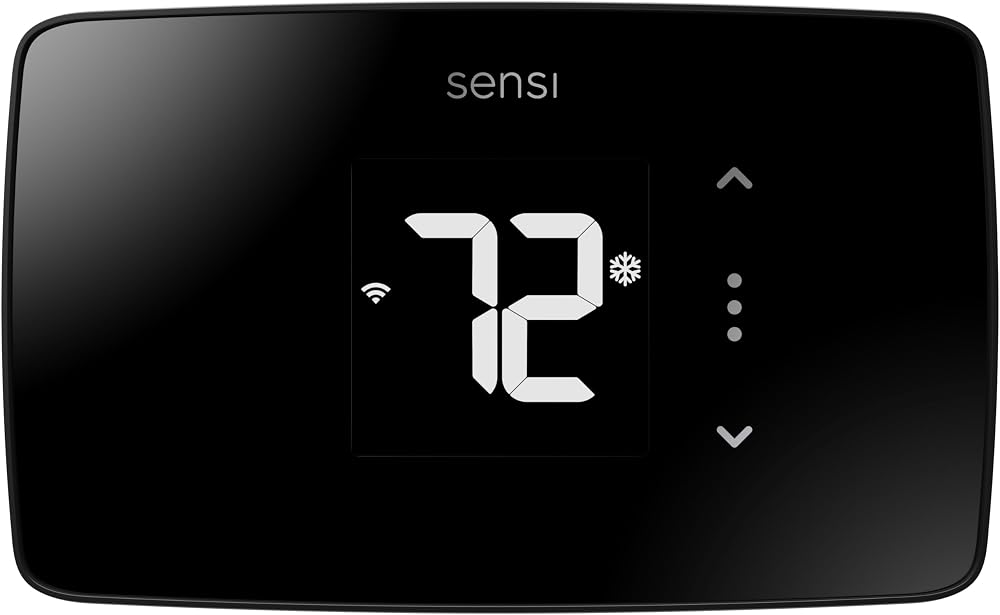
Our Winner: Sensi Smart Thermostat, Wi-Fi, DIY, Alexa, Energy Star Certified, ST55
The Sensi ST55 is listed as not requiring a C wire in most applications. It has physical buttons, fits the footprint of a traditional thermostat, and carries a 4.4 out of 5 rating, the highest among the products with complete listing data here.
What a C Wire Does and Why It Matters
The C wire (common wire) does not control heating or cooling. It supplies constant 24-volt power to the thermostat so the Wi-Fi radio and screen stay on.
Older mechanical thermostats did not need it. Smart thermostats draw continuous power, so they get it either from a C wire or by borrowing small amounts of power from the heating and cooling wires.
Works Without a C Wire vs. Works With an Adapter
These are not the same thing. A thermostat that works without a C wire runs on the wires you already have. A thermostat that works with an adapter needs an extra part, such as a power extender kit, to replace the missing C wire.
Buyers often assume the two are interchangeable, and that causes returns. The table below separates them using the listing data.
How We Compared These Models
This comparison is based on listing specifications and patterns in verified buyer ratings, not hands-on testing. The criteria were: C wire requirements stated in the listing, whether an adapter is needed, DIY installation difficulty, and system compatibility.
| Product | Key Specs | Our Choice | Action |
|---|---|---|---|
| Sensi ST55 | 4.4/5 rating. C wire not required in most applications. Physical buttons. Energy Star certified. | Best Overall | |
| Sensi Lite ST25 | 4.0/5 rating. C wire not required on most systems. Required for heat pump and heat/cool only systems. Geofencing. | Best Budget | |
| ecobee Smart Thermostat Essential | 4.2/5 rating. Power Extender Kit (PEK) for homes without a C wire, sold separately. Color touchscreen. Works with HomeKit, Google Assistant, and Alexa. | Best with Power Accessory | |
| Sensi Lite ST25W | 4.0/5 rating. Same listed C wire rules and features as the ST25. Higher listed price. | Alternate Pick | |
| Unnamed listing (ASIN B075BF6V58) | 4.5/5 rating. No brand, features, or specs in the data. Verify before buying. | Verify First |
No C Wire vs. Adapter: Quick Separation
| Model | Runs Without C Wire? | Accessory Path |
|---|---|---|
| Sensi ST55 | Most applications | Not specified in listing |
| Sensi Lite ST25 / ST25W | Most systems, but not heat pump or heat/cool only | C wire needed for those system types |
| ecobee Essential | Listing points to an accessory | ecobee Power Extender Kit, sold separately |
In-Depth Reviews

1. Sensi Smart Thermostat ST55 – Best Overall
Our Verdict: The ST55 combines the most favorable C wire language in this group with the best buyer rating among fully documented listings. It suits homeowners who want a familiar button interface and no add-on parts.
The listing states a common wire is not required in most applications. It also says the unit fits the same space as a traditional thermostat, so there is no need to patch and paint the wall.
Maintenance features include usage reports, equipment alerts, and filter reminders. The listing claims savings of about 23% on HVAC energy, a manufacturer figure that depends on your home and habits.
Why We Like It
- C wire not required in most applications, per the listing
- Buttons and a familiar footprint
- Built-in level and app-guided DIY installation
- Maintenance reminders and equipment alerts
Pros & Cons
Pros
- 4.4/5 rating
- No wall patching needed
- Energy Star certified
Cons
- Highest listed price of the Sensi models
- Exceptions to the no-C-wire claim are not detailed in the listing
2. Sensi Lite Smart Thermostat ST25 – Best Budget
Our Verdict: The ST25 is the lowest-priced option here at $68.48. It works for many homes without a C wire, with one important limit.
The listing says a C wire is required for heat pump and heat/cool only systems. It is not required on most other systems. Check your system type before ordering.
Features include geofencing, scheduling, remote access, and usage reports. The listing also states Sensi will not sell personal data to third parties.
Why We Like It
- Lowest price in the group
- Geofencing and flexible scheduling
- Built-in level for easier mounting
Pros & Cons
Pros
- Lowest entry price
- Energy Star certified
- Works with Alexa
Cons
- C wire required for heat pump and heat/cool only systems
- 4.0/5 rating trails the ST55

3. ecobee Smart Thermostat Essential – Best with Power Accessory
Our Verdict: The ecobee Essential is the most feature-rich option here, but its no-C-wire path relies on a separate accessory. It fits buyers who want a touchscreen and broad smart home support.
The listing says ecobee offers a Power Extender Kit (PEK) for homes without a C wire, sold separately. This is an adapter path, not true no-C-wire operation. Budget for the extra part.
The listing says it works with most 24 VAC systems, including gas, oil, electric, dual fuel, forced air, heat pumps, and boilers. It supports Apple HomeKit, Google Assistant, and Alexa. ecobee offers an online compatibility checker, which the listing recommends using first.
The listing shows a GBP price on the amazon.com data, so confirm the current USD price on Amazon.
Why We Like It
- Color touchscreen and app control
- HomeKit, Google Assistant, and Alexa support
- eco+ features including humidity detection and time-of-use preheating or precooling
- Optional SmartSensor support, sold separately
Pros & Cons
Pros
- Broad ecosystem support
- Official compatibility checker
- Clear accessory path for no-C-wire homes
Cons
- PEK sold separately
- Listed as compatible with 85% of systems, not all

4. Sensi Lite Smart Thermostat ST25W – Alternate Pick
Our Verdict: The ST25W lists the same features and C wire rules as the ST25. At $85.84, it costs more, so choose it only if the ST25 is unavailable.
The listing repeats the same warning: a C wire is required for heat pump and heat/cool only systems. Nothing in the listing explains the price gap between the two versions.
Why We Like It
- Same geofencing and scheduling as the ST25
- Energy Star certified
Pros & Cons
Pros
- Familiar Sensi app and DIY process
- C wire not required on most systems
Cons
- Costs more than the ST25 with no listed extra features
- C wire required for heat pump and heat/cool only systems

5. Unnamed Listing (B075BF6V58) – Verify First
Our Verdict: This listing has a 4.5 out of 5 rating, but the data does not include a brand, model, features, or C wire details. We cannot confirm it works without a C wire.
Open the Amazon page and read the compatibility section before buying. Look for the stated C wire requirement, supported system types, and any included adapter.
Why It Is Worth Checking
- Highest rating in this group
- May suit your system, but this is unverified
Pros & Cons
Pros
- 4.5/5 rating
Cons
- No brand, specs, or C wire details available here
Does a Nest Thermostat Work Without a C Wire?
Often, yes. Google says Nest thermostats are engineered to use very little power and in many cases run without a C wire. See Google’s Nest thermostat compatibility page for your exact system.
Google says the Nest Learning Thermostat (4th gen) is designed to work whether or not the home has a C wire. In limited cases, under 1%, a C wire or Nest Power Connector is necessary for enough power.
For the Nest Thermostat E and Nest Learning Thermostat, Google says a C wire may be needed if the unit has power issues or the battery often drains. No Nest models were in the product data for this guide, so they are not ranked here.
How to Check Your Wiring Before Buying
- Turn off power at the breaker before removing the old thermostat.
- Photograph the wires and note the terminal labels, such as R, Rc, Rh, W, Y, G, and C.
- Check whether a wire is tucked behind the wall plate with no label. It may be an unused C wire.
- Open the furnace or air handler panel and look for a C terminal on the control board.
- Confirm your system is 24 VAC, not line voltage or millivolt.
- Run the manufacturer’s compatibility checker with your wire labels and system type.
Heat-Only Systems: Worked Example
Say a home has a gas furnace and no cooling. The old thermostat has two wires, R and W, and nothing on the C terminal.
- Photograph the wires and check the furnace board for a C terminal.
- Confirm compatibility. The Sensi listings do not address heat-only systems directly, so use Sensi’s checker before ordering the ST25 or ST55.
- If a spare conductor exists in the cable, connect it to C at both ends.
- If not, consider an add-a-wire kit or a 24-volt adapter, which Home Depot’s thermostat installation guide lists as no-C-wire options.
- If compatibility fails, the ecobee Essential with the Power Extender Kit is the accessory path.
Decision Tree: Buy Now, Add an Accessory, or Run a Wire
- Buy now: Your system is standard 24 VAC, not a heat pump, and the maker’s checker approves it without a C wire.
- Add a power accessory: The checker says a C wire is needed and you cannot run one. Use an add-a-wire kit, a 24-volt adapter, or the ecobee PEK.
- Run a new C wire: The control board has an empty C terminal and the cable has no spare conductor. This is the most reliable fix for power problems.
Troubleshooting Power Problems After Install
If the thermostat reboots, loses Wi-Fi, or the battery drains, treat it as a power problem. Google says a C wire or a power accessory like the Nest Power Connector may be needed if setup indicates a power issue.
Re-check the wire connections first. Then add a C wire or accessory if the issue continues.
Frequently Asked Questions
Can I install a smart thermostat without a C wire?
Often, yes. Many models run on existing wires, but heat pump systems and some heat/cool only systems may still need one. Honeywell notes that many smart thermostats need a C wire or compatible power adapter.
What smart thermostat works without a C wire?
Based on the listings here, the Sensi ST55, Sensi Lite ST25, and ST25W state a C wire is not required on most systems. The ecobee Essential relies on a separate Power Extender Kit.
Is there a smart thermostat without a C wire for heat-only systems?
Possibly, but verify first. The listings do not address heat-only systems directly. Use the manufacturer’s compatibility checker and plan for an add-a-wire kit or adapter as a backup.
How do I install a smart thermostat without a C wire?
Turn off power, label and photograph the wires, and confirm compatibility. Then mount the base, connect the wires, and follow the app setup. For model-specific steps, see the Honeywell installation guide.
What happens if the thermostat loses power or the battery drains?
It can go offline, lose its schedule connection, or stop controlling the system. Frequent drain signals insufficient power, which usually means you need a C wire or power accessory.
Conclusion
For most homes without a C wire, the Sensi ST55 is the best starting point, and the Sensi Lite ST25 is the budget pick if your system is not a heat pump. The ecobee Essential suits buyers willing to add a power extender kit.
Confirm your system type and wire labels before ordering. If power problems appear later, a C wire or accessory is the fix.
Affiliate Disclosure: As an Amazon Associate, we may earn commissions from qualifying purchases from Amazon.com. This comes at no extra cost to you and helps support our research.