A blinking red power light on a Ninja Professional blender usually means a safety lock is on, not that the motor is broken. On models like the NJ600 and BL610, the light flashes when the pitcher, blade assembly, or lid is not fully installed, so the safety interlock stops the motor from starting. This guide shows you how to reseat each part, listen for the right clicks, and decide when to stop and call Ninja support.
Quick answer
Unplug the blender. Lift off the pitcher, then set it back on the base and turn it clockwise until it clicks. Line up the arrows on the lid, then press the handle down until it clicks. Plug the blender back in. The light should stop blinking and stay solid red. If it still blinks, contact Ninja support. Do not try to bypass the safety switch.
- On Ninja Professional models, a blinking red light means the pitcher or lid is not installed correctly.
- The pitcher must lock onto the base and the lid handle must click shut. Fixing only one of them is not enough.
- Food stuck around the blade opening or the lid mechanism can stop the safety switch from engaging.
- A solid light means the blender is ready. If it keeps blinking after careful reassembly and cleaning, call Ninja support.
- Why is my Ninja blender blinking red?
- What do the different lights mean?
- How do I fix a Ninja blender blinking red?
- How do I correctly lock the Ninja pitcher onto the motor base?
- How do I align and close the Ninja blender lid?
- Could food or residue be preventing the safety switch from engaging?
- Is it overheating or overload instead?
- Which problem do you have?
- When should I stop troubleshooting and contact Ninja support?
- What do owners say?
- Frequently Asked Questions
Why is my Ninja blender blinking red?
Your blender is telling you that it is not fully put together. The safety interlock is a small switch that only lets the motor run when every part is locked in place. It protects your fingers from the spinning blades.
The Professional Blender owner manual says the power button flashes and the motor will not run when the container and lid are not installed correctly. Ninja’s BL610 series FAQ says the same thing: a blinking power button means the pitcher is not installed correctly.
Most of the time, the motor is fine.
What do the different lights mean?
Use this table to match what you see to the most likely cause.
| What you see | Most likely cause | What to do |
|---|---|---|
| Power light blinking red | The pitcher is not locked, the lid handle is not closed, or the blade is not fully seated | Unplug the blender and put it back together using the checklist below |
| Solid power light | The container and lid are installed correctly (per the Professional manual) | Choose a speed and blend |
| No light at all | No power is reaching the base | Check the plug, the outlet, and your breaker. Try a different outlet |
| Still blinking after you reassemble it correctly | Food stuck in the lock areas, or a worn interlock switch | Clean the parts, retest, then contact support |
| Motor stops in the middle of blending | The motor overheated, or the load is too heavy | Unplug the blender and let it cool. Use fewer ingredients or add more liquid |
| Red/green or other blinking patterns | The meaning depends on the model, especially on cordless or newer units | Check the manual for your exact model before you troubleshoot |
How do I fix a Ninja blender blinking red?
Take the blender apart and put it back together in the right order. This two-minute checklist covers every part the safety switch checks:
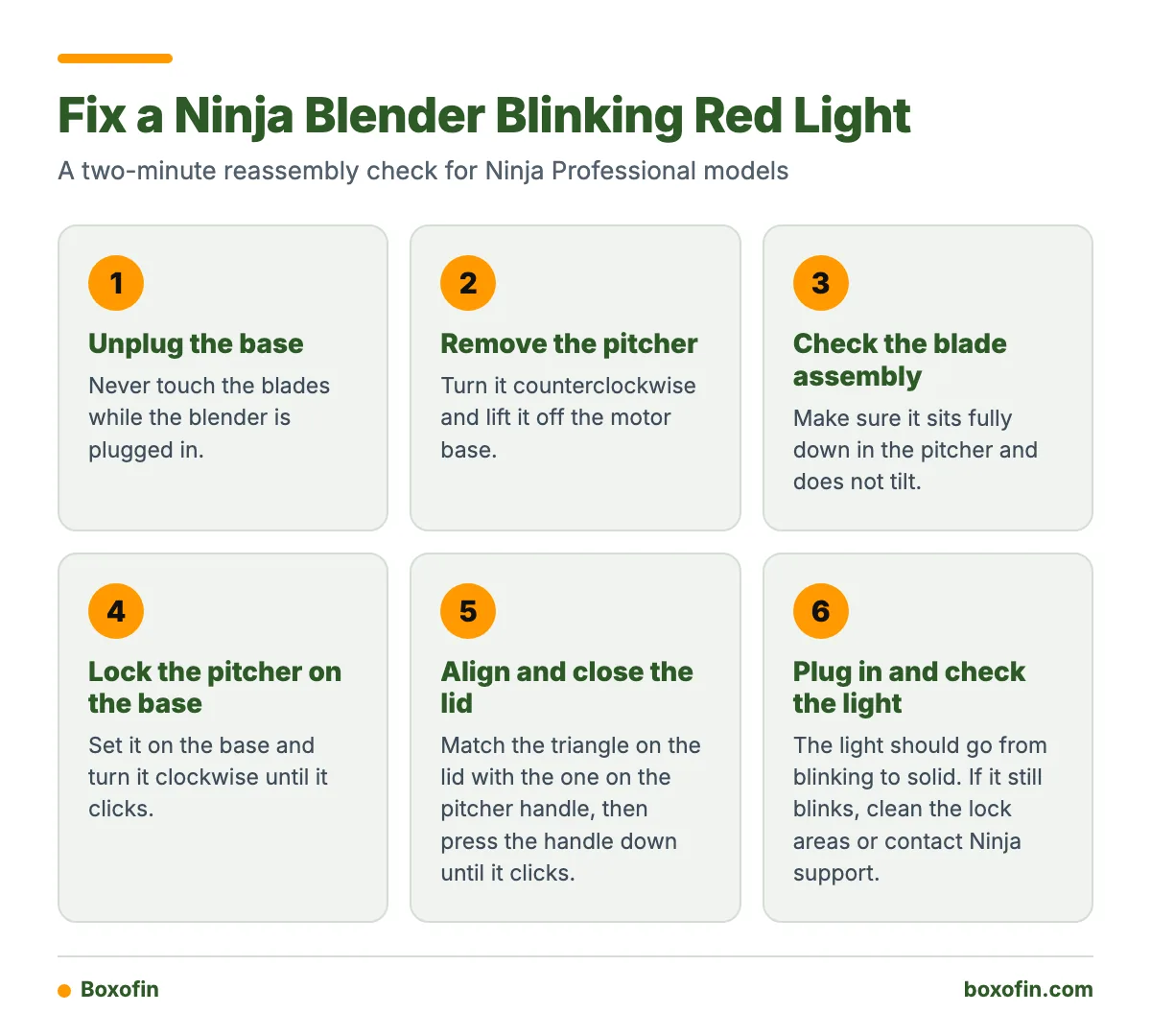
- Unplug the base. Never touch the blades while the blender is plugged in.
- Remove the pitcher. Turn it counterclockwise and lift it off.
- Check the blade assembly. Make sure it sits fully down in the pitcher and does not tilt.
- Put the pitcher back on the base. Turn it clockwise until it clicks.
- Line up the lid arrows. Match the triangle on the lid with the one on the pitcher handle.
- Close the handle. Press it down until you hear a click.
- Plug in and check the light. It should go from blinking to solid.
How do I correctly lock the Ninja pitcher onto the motor base?
Set the pitcher on the base and turn it clockwise until it clicks. Ninja’s BL610 FAQ gives this exact instruction. Many guides only tell you to reseat the lid, but a loose pitcher keeps the light blinking even when the lid is perfect.
Check two things. First, the pitcher should sit flat on the base with no rocking. Second, you should not be able to turn it any further. If it feels stiff, lift it off and look for spilled food on the base.

How do I align and close the Ninja blender lid?
Line up the arrows, then press the handle down until it clicks. Ninja’s CO610B guidance says the triangle symbols on the lid must line up and the handle must click shut. Otherwise, the blender will not power on.
If the handle stays partly raised, the lid is not latched. Lift it, check that the seal sits flat, and try again.
Worked example
An NJ600 owner finishes a smoothie and washes the pitcher. Then the light blinks red and the blender will not start. The owner unplugs the base, takes off the pitcher, and pushes the blade assembly back down. Next, the owner turns the pitcher clockwise until it clicks. Then the owner lines up the lid triangles and presses the handle until it clicks. After plugging back in, the light turns solid. That matches what Ninja’s NJ600 FAQ describes. Each of the seven steps takes about 15 seconds, so the full check takes under two minutes.
Could food or residue be preventing the safety switch from engaging?
Yes, this is one of the most common hidden causes. Food or other objects around the blade opening can stop the blade assembly from sitting fully down. They can also stop the lid’s safety lock from engaging.
- Wipe the top of the motor base with a damp cloth, with the base unplugged. Never put the base in water.
- Clean the lock tabs on the bottom of the pitcher, where it meets the base.
- Rinse the lid latch and the area around the handle. Dried sugar from smoothies can get stuck there.
- Dry every part before you put the blender back together.
Is it overheating or overload instead?
Overheating is a different problem from the blinking assembly light. It usually shows up as a motor that stops in the middle of blending. It is less likely to be a blender that will not start at all.
Some Ninja Professional documentation says an overheated unit may need to be unplugged and cooled for about 15 to 20 minutes before you use it again. To avoid overload, stay under the max fill line. Add liquid to thick mixes, and blend frozen fruit in smaller batches.
Which problem do you have?
If the light blinks before you press any speed button → the blender is not put together correctly. Follow the two-minute checklist.
If the pitcher won’t turn fully or the handle won’t click → food or residue is in the way. Clean the base, pitcher tabs, and lid latch.
If the motor stopped in the middle of blending with a heavy load → it may have overheated. Unplug it and wait 15 to 20 minutes.
If the motor strains on thick mixes → the load is too heavy. Add liquid or blend smaller batches.
If it still blinks after you clean it, reassemble it, and cool it → the interlock may have failed. Contact Ninja support.
When should I stop troubleshooting and contact Ninja support?
Stop after two careful attempts with clean, dry parts and clear clicks at both the pitcher and the lid. If the light still blinks, the interlock switch or a lock tab may be worn or broken. That is a repair job.
Do not try to bypass the safety switch. Some online advice suggests pushing an object into the interlock slot or taping the switch down. This defeats a feature built to keep your hands away from moving blades. It can also void your warranty. Check the Professional Blender owner manual for warranty details. Then contact Ninja with your model number, which is printed under the base.
Also stop right away if you notice a burning smell, a cracked pitcher, or damaged lock tabs.

What do owners say?
Owners like
- The powerful motor blends quickly.
- The large pitcher fits smoothies for the whole family.
- The pitcher, lid, and blades come apart and are fairly easy to clean.
Common complaints
- The safety lock can stop the blender even when the parts look fitted.
- Residue around the base, pitcher, or lid can make the blender seem broken.
- Some units keep blinking after correct reassembly, which suggests interlock wear.
- The blender is loud, and a tight pitcher or blade assembly can be hard to remove.
Summarised from owner reviews and long-term user reports; individual experiences vary.
Frequently Asked Questions
How to turn on ninja blender blinking red light?
You can’t start it while the light blinks. Lock the pitcher clockwise until it clicks, then close the lid handle until it clicks. Once the light is solid, press a speed button.
Why is my ninja blender blinking red and not working?
The safety interlock is blocking the motor because the pitcher, blade assembly, or lid is not fully seated. Food stuck in the lock areas is the next most likely cause.
Why is my ninja blender blinking red power button?
On Professional models, a flashing power button means the container and lid are not installed correctly. A solid button means the blender is ready to use.
What to do when ninja blender blinks red?
Unplug the blender. Reassemble it using the two-minute checklist, clean any residue, and retest. If it still blinks, contact Ninja support instead of tampering with the switch.
What should I do if my Ninja Professional blender keeps blinking red?
Clean and dry the base, pitcher tabs, and lid latch. Then reassemble it once more, listening for both clicks. If it keeps blinking, the interlock may have failed, so contact Ninja support.
Sources